Immigration Policy
ICA Photo Requirements: Complete Guide to Singapore PR & Citizenship Photos
Complete guide to ICA photo requirements for Singapore PR, citizenship, and passport applications with specifications, DIY tips, studio recommendations, and what to do if rejected.
Last updated: March 2026
If you're applying for Singapore permanent residency, citizenship, or a passport renewal, one detail can make or break your application: the photo. The Immigration and Checkpoints Authority (ICA) has strict specifications for identification photos, and getting them wrong can mean delays, rejections, and resubmissions. This guide covers ICA photo requirements, including official specifications, application-specific differences, DIY tips, studio recommendations, and what happens if your photo gets rejected.
Official ICA photo specifications
The ICA maintains consistent standards across all immigration applications. These specifications ensure photos are clear, consistent, and compatible with facial recognition systems used in immigration processing.
Photo Specifications
Five critical ICA photo requirements
Physical Size
35×45mm International standard
Digital Size
400×514px e-Services portal
File Size Max
8MB Target: under 60KB
Photo Age
3 months Before application
All formats accepted: JPEG, HEIC, HEIF, PNG · Full colour only · White background required
Physical Photo Dimensions
The standard photo size is 35mm wide by 45mm high (without borders). This is the international passport photo standard established by ICAO (International Civil Aviation Organisation). Within that frame, your face should measure between 25mm and 35mm from chin to crown of head, occupying about 70-80% of the photo height. This sizing ensures your facial features are clear enough for officials to verify your identity and work with automated facial recognition systems.
Digital Photo Requirements for e-Service
When submitting photos online through the ICA e-Services portal, your photo must meet different technical specifications than physical prints:
- File format: JPEG (.jpg or .jpeg), HEIC, HEIF, or PNG accepted
- Exact pixel dimensions: 400 x 514 pixels (international standard for ICAO-compliant photos)
- File size: Maximum 8MB for PR, citizenship, LTVP, and NRIC applications; 60KB maximum for visa applications. For faster upload speeds on PR/citizenship/LTVP applications, aim for files under 60KB
- Color: Full colour photograph required (not black and white, grayscale, or sepia)
The e-Services system validates dimensions and file size automatically when you upload. If your photo doesn't match these specs, the system will reject it before you submit your application.
Pre-Upload Validation Checklist
Before uploading your photo to e-Services, verify:
- Dimensions: Exactly 400 pixels wide × 514 pixels tall (check File Properties or Image Info)
- File size: Under 8MB (60KB recommended for faster upload)
- Format: JPEG, HEIC, HEIF, or PNG only
- Color: Full colour (not black-and-white or grayscale)
- Appearance: Face occupies 70-80% of frame, centered, white background, clear lighting
Background and Lighting Requirements
Your photo must have a plain white background with no patterns, objects, or other people visible. The white background provides high contrast, which helps facial recognition systems process your image accurately during identity verification. The background should be matt or semi-matt (not glossy or shiny, which creates reflections). The photo must be bright with even lighting across your face, with no shadows obscuring your features. Avoid backlighting (light behind you) or harsh shadows under the nose, eyes, or jaw.
Facial Requirements
You must face the camera directly with your head upright and level. Your eyes should be open, looking straight at the lens with a neutral or natural expression. Hair should be neatly combed and not covering your face. Glasses are permitted in most cases, though they may cause reflections depending on your application type (see the application-specific section below for details). Your photo must be recent, taken within the last three months before submitting your application. This ensures the photo matches your in-person appearance for identity verification at interviews and collection appointments.
ICA photo requirements for PR applications vs citizenship vs passport renewals
Application Types
ICA photo requirements by application type
Permanent Residency
400×514px or 35×45mm · Within 3 months · e-Services or paper submission
Citizenship
Same as PR · Processing up to 12 months; updated photo may be needed at registration
Passport Renewal
Same as PR · Only new photo needed if appearance changed significantly
NRIC Collection
Within 3 months of collection appointment · Taken at office or brought current photo
While the core specifications remain consistent, subtle differences exist between application types.
Permanent Residency (PR) Applications
Your photo should follow the standard ICA specifications listed above. Most PR applicants submit digital photos through the e-Services portal (400x514 pixels, 8MB maximum; 60KB recommended for faster uploads), though you may also include a physical print with supporting documents depending on your application method. The ICA's facial recognition system uses your submitted photo to verify your identity throughout the PR processing timeline.
Citizenship Applications
Citizenship photo requirements are identical to PR applications at the submission stage. Since citizenship applications can take up to 12 months to process, the photo you submitted initially may no longer meet the 3-month recency requirement by the time you reach the registration appointment. Be prepared to provide a current photo at that stage if requested.
Passport Renewals
Passport renewal photos follow the same ICA specifications as PR applications. For online renewal through e-Services, you'll upload a digital JPEG at 400x514 pixels. If you're renewing because your appearance has changed significantly (weight loss, gaining hair, major style change), the ICA may compare your old and new photos for consistency — so consistency across multiple applications matters if you're in the middle of an immigration process.
NRIC (National Registration Identity Card) Collection
After your PR is approved, you'll collect your NRIC in person at an ICA office. The photo used on your NRIC must be taken within three months of your collection appointment, so plan your photo session accordingly. It follows the same specifications as above.
Quick Comparison: Photo Requirements by Application Type
| Requirement | Permanent Residency | Citizenship | Passport & NRIC |
|---|---|---|---|
| Photo Age | Within 3 months before submission | Within 3 months before submission | Within 3 months before submission |
| Digital Format | 400×514 pixels, 8MB max (60KB recommended) | 400×514 pixels, 8MB max (60KB recommended) | 400×514 pixels, 8MB max (60KB recommended) |
| Physical Format | 35×45mm print | 35×45mm print | 35×45mm print |
| File Formats | JPEG, HEIC, HEIF, PNG | JPEG, HEIC, HEIF, PNG | JPEG, HEIC, HEIF, PNG |
| File Size Limit | 8MB maximum | 8MB maximum | 8MB maximum |
| Submission Method | e-Services portal or paper | e-Services portal or paper | e-Services or in-person |
| Typical Processing Time | ~6 months | Up to 12 months | ~4 weeks (online) |
| Background | Plain white background | Plain white background | Plain white background |
Bottom line: All application types require photos within 3 months, but citizenship and NRIC collections may request fresh photos closer to your appointment. Plan your photo session strategically if you have multiple applications in progress.
Step-by-step: how to take your own ICA-compliant photo at home
Many applicants successfully take their own photos at home and save the cost of a professional studio. The key is proper lighting, positioning, and using the right equipment. Here's how to do it.
Equipment You'll Need
You don't need expensive gear. A smartphone camera is sufficient, along with a plain white background (white bedsheet, white poster board, or white wall) and good lighting.
For lighting, natural window light on a cloudy day works well (diffused, even light without harsh shadows). Direct sunlight creates harsh shadows and causes squinting, so avoid it. Alternatively, use two desk lamps or clip lights positioned at 45-degree angles on either side of your face. A simple tripod or phone stand keeps the camera at eye level and steady.
A simple ruler or measuring tape helps you verify your face meets the biometric requirement: your head should measure 25-35mm from chin to crown when you look at your final photo. This ratio is essential for facial recognition compatibility.
Setting Up Your Shot
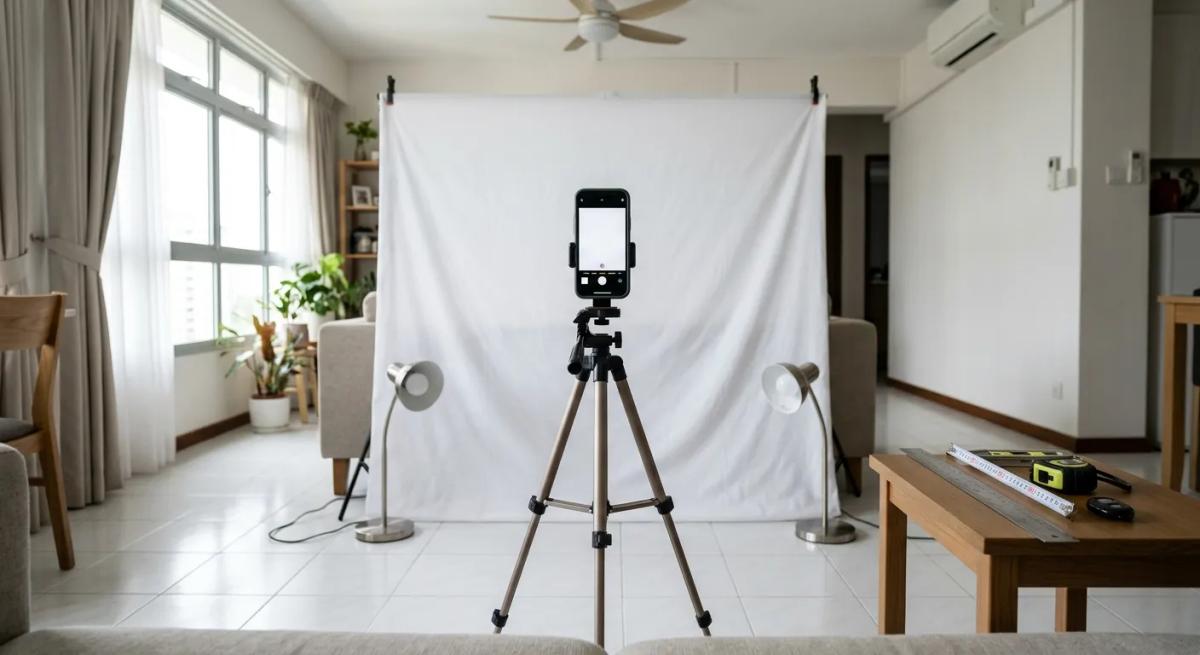
Mount your phone on a tripod or secure it in a stand at eye level, not pointing down at you or up from below. Position the white background directly behind you, ensuring it fills the entire frame with no edges or wrinkles visible. Step back so your face fills 70-80% of the frame (roughly arm's length away from the camera, depending on lens width). Ensure even lighting falls across your entire face with no shadows under your nose, eyes, or jaw.
Camera and Smartphone Settings
Use your phone's standard camera app, not portrait mode (which applies artificial smoothing and blurs the background). Set it to the highest resolution available. Disable beauty mode, face smoothing, and any filters. Do not use HDR mode. Take 10-15 shots in succession, slightly adjusting your head position between shots to capture the best expression and positioning.
Positioning and Expression
Look directly at the lens with your eyes open and a neutral expression (slight smile is acceptable, but not a wide grin or closed-mouth grimace). Keep your head upright and level, not tilted to one side. Hair should be tucked away from your face. If you wear glasses, ensure they're clean and positioned straight on your face without reflection.
Resizing and Converting Your Photo
After taking your shots, select the best one. Use a free online tool like Pixlr, Canva, or basic photo editing software to resize your image to exactly 400 x 514 pixels. Keep your face centred and correctly positioned (70-80% of frame, biometric measurement 25-35mm head height). Export as JPEG and check the file size. It should be under 60KB for e-Services uploads (8MB is the maximum, but smaller files upload faster). If larger than 60KB, reduce the JPEG quality in your editor:
- Start at 75% quality, check file size
- If still over 60KB, try 70%, then 65%, etc.
- Test at each setting to ensure image remains sharp and clear
- Avoid going below 60% quality (image becomes pixelated)
Test upload to the e-Services portal before submitting your actual application.
Common DIY mistakes to avoid
Avoid direct sunlight (creates harsh shadows and squinting). Don't include your shoulders or upper body if it makes your face smaller. Don't crop too tightly; you need some head space. Avoid filters, black-and-white conversion, or editing that changes your appearance. Don't wear hats, headbands, or sunglasses unless permitted for religious/cultural reasons. Keep your head level and facing directly forward, not at an angle.
Tip: Not confident about DIY photography? Our PR and citizenship consultants have guided over 1,000 applicants through complete applications, including photo submission. If you'd rather let professionals handle your photo, we can arrange it or guide you through the process. Learn about our PR application services or explore our citizenship application support.
Where to get professional ICA-compliant photos in Singapore
If you prefer a professional studio, Singapore has many options that understand ICA specifications and deliver compliant photos.
Why use a professional studio
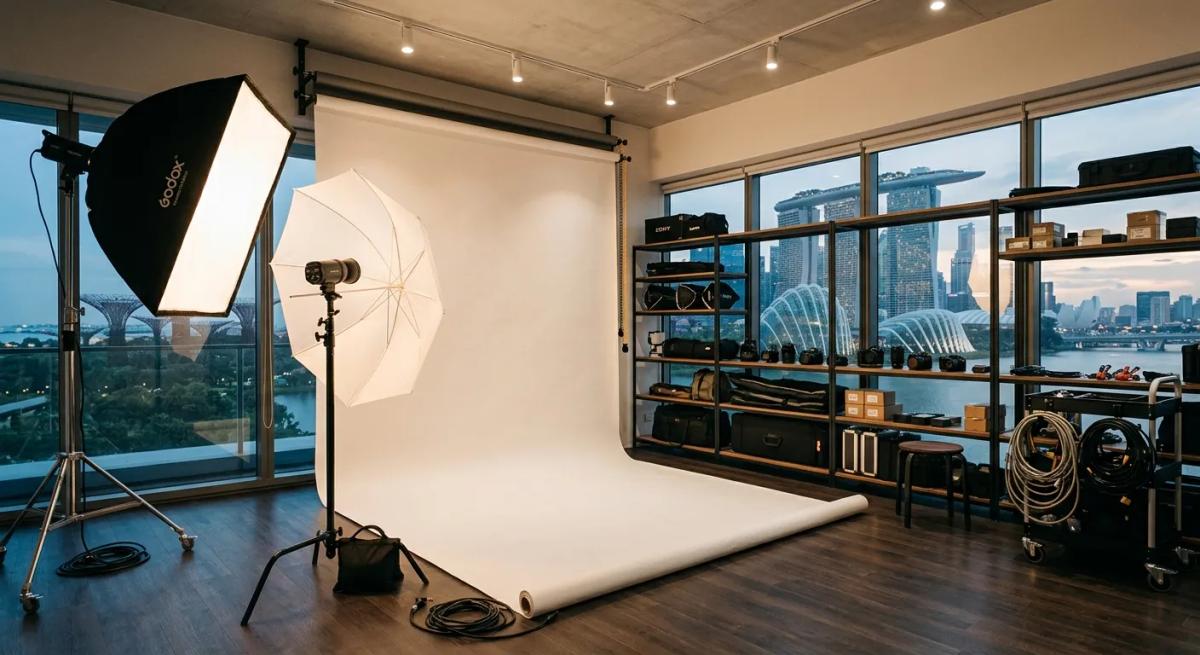
Professional studios have optimised lighting setups, backgrounds, and experienced photographers who position subjects correctly. They resize and deliver your digital photo in the correct format immediately. Many studios offer free reshoot guarantees if you're unhappy with the first attempt. This can be valuable if you're close to an application deadline.
How to find ICA-compliant studios
Search for "ICA compliant photo studios Singapore" or "passport photo studios Singapore" online. Most professional photo studios mention ICA compliance on their websites. When calling ahead, confirm they understand current 2026 ICA specifications (35mm x 45mm physical, 400x514 pixels digital). Ask whether they provide instant digital files in the correct format and what their reprint policy is.
Popular photo studio locations
Central Singapore (CBD, Raffles Place, Marina Bay) has numerous studios, including high-street chains. Tanjong Pagar and Chinatown have established studios. Bukit Merah (Tiong Bahru, Outram Park) has reliable options. Clementi and Buona Vista serve the western zones, while Bedok and Tampines have options for east-side residents. Most studios open 10am-8pm, though hours vary, so call ahead, especially on weekends.
Typical costs and turnaround
Photo Options
Cost comparison: DIY vs Kiosk vs Studio
🏠
DIY at Home Free Smartphone + white background + good lighting · Takes 30–60 minutes · Best for confident photographers
📸
Photo Kiosk SGD 12–18 Fast (5–10 min) · Guaranteed white background · Found in malls · Instant digital file
👔
Professional Studio SGD 15–35 Expert positioning · Best lighting · 1–2 hour turnaround · Free reshoot guarantee
Digital files usually included or extra SGD 5–10 · Rush service may add charges · All options produce ICA-compliant results
Professional studios in Singapore charge SGD 15-35 for a standard ICA photo set (usually 4-6 prints). Digital files are usually included or cost an extra SGD 5-10. Rush services (same-day or 2-hour turnaround) may incur a surcharge. Standard turnaround is 1-2 hours. Larger studios may offer discounts for multiple sets (PR, citizenship, NRIC).
Instant photo kiosks and automat photo booths in Singapore
For a fast, budget-conscious option between DIY and studio, photo kiosks and automat booths are available throughout Singapore.
How photo kiosks work
Self-service photo kiosks in shopping malls let you take photos in a standardized booth with consistent lighting and background. You select your best shot, resize it to 400×514 pixels on the kiosk's built-in software, and either print immediately or receive a digital file via email or USB. The process takes 5-10 minutes.
Pros and cons
Advantages: fast (5-10 minutes), affordable (SGD 10-20), no human interaction needed, guaranteed white background and standard lighting, instant digital copy. Disadvantages: limited customization (can't adjust pose mid-session), booth may have slight lighting variations, no professional guidance on positioning.
Typical locations
Photo kiosks are found in major shopping centres: ION Orchard, Takashimaya, Plaza Singapura, The Cathay, 313@Somerset, Paragon. Ask centre management if you don't see one. Most kiosks operate 10am-9pm daily.
Cost and digital output
Typical cost: SGD 12-18 for physical prints and digital copy. Most kiosks email digital files in JPEG format sized to 400×514 pixels. Confirm the kiosk outputs the correct dimensions before proceeding. This option works well if you're comfortable with automated systems and need photos quickly.
Special considerations: photos for religious headgear, glasses, and children
The ICA recognizes that not all applicants fit a standard profile. Here's how to navigate these special cases.
Religious and cultural headgear
The ICA permits headgear worn for religious or cultural reasons, provided it doesn't obscure facial features. This includes headscarves (hijab), turbans, religious head coverings, and traditional headwear. Your forehead, eyes, nose, mouth, and chin must be clearly visible. The headgear itself can be in the photo, but it cannot cast shadows over your face or hide any identifying features. If you're unsure, ask your photographer or contact the ICA beforehand.
Glasses and spectacles
Glasses are generally permitted, but they can cause problems if reflections obscure your eyes. If possible, take two versions: one with glasses and one without, and submit the clearer one. For successful glasses photos:
- Ensure glasses are clean (dust or smudges reduce clarity)
- Position glasses straight on your face (tilted glasses cause reflections)
- Use glasses with anti-reflective coatings if available
- Angle your face slightly downward to minimize lens reflection
- Position lights at 45-degree angles, not directly in front
Some application types (like certain visa categories) have stricter rules on glasses, so check your specific requirements.
Infant and child photography
Young children may be photographed with assistance. Infants can have a blank stare (they can't follow instructions to smile or look alert). Older children should follow standard requirements as closely as possible, but minor expression variations are acceptable for children under 10. Parental assistance with positioning is fine. The key is that facial features must be clear and the child must look toward the camera.
Scars, marks, and distinctive features
Your photo must represent your current appearance honestly. Scars, birthmarks, moles, and other distinctive features should be visible in your photo as they appear in person. The ICA uses photos for facial recognition and identity verification, so the photo must match your appearance at interviews and collection appointments. Don't hide or edit out distinctive features, as this will raise flags during verification.
Common photo rejection reasons and how to avoid them
Understanding common rejection reasons helps you avoid delays.
Poor lighting (most common)
Insufficient lighting is the leading rejection reason. Signs include shadows across your face, uneven brightness, backlighting (face in shadow, bright background), or underexposed photos. Solution: Use professional lighting or natural window light on a cloudy day. Position lights at 45-degree angles on either side of your face. Avoid direct sunlight and backlighting. Stand with your light source in front of and to the side, not behind you.
Technical non-compliance
The e-Services system automatically rejects photos with wrong pixel dimensions (not 400x514) or file sizes exceeding the application-specific limit (8MB for PR/citizenship/LTVP/NRIC; 60KB for visa applications). Unsupported file formats are also rejected. Physical photos with incorrect size (not 35x45mm) will be flagged. Solution: Before uploading, verify your photo's pixel dimensions and file size using your phone's file properties or a photo tool. Use JPEG export with 70-80% quality to keep files small for faster uploads.
Background issues
Common problems include non-white backgrounds, shadows, wrinkles, visible objects or people, and glossy backgrounds that reflect light. Solution: Use a seamless white backdrop (poster board works well). Ensure it's flat, unwrinkled, and fills the entire frame. Avoid shiny backgrounds or those with texture. Test your background lighting separately to confirm there are no shadows or reflections.
Facial and appearance issues
Photos are rejected when facial features aren't visible, eyes are closed or not looking at camera, head angles are extreme, or headgear is unauthorized. Solution: Face the camera directly with your head level. Open your eyes and look at the lens. Ensure hair doesn't cover your face. Confirm any headgear is permitted. Take multiple shots to ensure at least one is perfectly positioned.
Quality and focus issues
Blurry photos, pixelated or compressed images, dust or damage, and extreme expressions are rejected. Solution: Use the highest camera resolution available. Take multiple shots to ensure at least one is sharp in focus. Inspect your white background for dust or marks before shooting. Check the final photo carefully before uploading; zoom in to verify details are sharp and clear. Use consistent lighting to avoid uneven exposure.
Photo age issues
Photos taken more than three months before application submission are rejected. Multiple photos showing inconsistent appearance (different hair, dramatic weight change) raise flags. Solution: Take your photo within two weeks of submitting your application to ensure it's current. If you have multiple applications in progress, use consistently recent photos across all of them.
What to do if your photo gets rejected
Rejection isn't the end. The ICA provides feedback, and resubmission is straightforward.
Understanding rejection notifications
The ICA provides a reason when rejecting a photo. The rejection is issued either automatically (if e-Services detects technical non-compliance) or by an officer reviewing your application. You receive notification in your ICA account or via the e-Services portal. Read the rejection reason carefully; it tells you exactly what needs to be fixed.
Resubmitting corrected photos
Log back into the e-Services portal or contact the ICA with your application reference number. Most rejections allow immediate resubmission without re-opening the entire application. Follow the feedback provided (if it says "lighting," focus on better lighting; if it says "background," redo your white background). Take a fresh photo following the corrections and resubmit through the same portal. The ICA typically reprocesses resubmitted photos within 1-3 working days.
Appeals and resubmission timeline
You can request a manual review by writing to the ICA with your application number and explanation if you believe the rejection was in error. However, most rejections are valid, so focus on fixing the actual issue rather than appealing. Resubmitting a corrected photo within 1-2 weeks typically doesn't delay your overall timeline. Only if you miss resubmission deadlines does rejection become critical.
Digital photo requirements for ICA e-Service online applications
The ICA's e-Services portal is now the standard for most applications. Understanding its specific requirements prevents rejection at the upload stage.
Exact pixel dimensions
The portal enforces exactly 400 pixels wide by 514 pixels tall. It will not accept 401 x 514 or 400 x 513. Use an online tool or photo editor to verify and resize precisely. Free tools like Pixlr, Canva, or Windows Photo Editor allow you to specify exact pixel dimensions. Verify in the image properties after resizing that dimensions are exactly 400 x 514.
File size limit
For PR, citizenship, LTVP, and NRIC applications, the maximum file size is 8MB. However, aim to keep your file under 60KB after resizing for faster uploads. (Note: 60KB is a strict limit only for visa applications; PR and citizenship allow up to 8MB.) After resizing to 400x514 pixels, export as JPEG and check the file size in your file manager. If it's over 60KB, reduce the JPEG quality (70-85% quality is a good balance). Re-export and recheck file size. Repeat until you're under 60KB.
Format and colour requirements
JPEG (.jpg or .jpeg), HEIC, HEIF, and PNG formats are accepted for PR, citizenship, LTVP, and NRIC applications. Visa applications accept JPEG only. The photo must be full colour (not black and white or grayscale). The portal provides instant feedback if the format is wrong; you'll see an error message before submitting. Confirm your export settings use a supported format and full colour.
Pre-upload validation tools
Before uploading to the real e-Services portal, test your photo using an online validator. The portal itself validates format, dimensions, and file size when you upload. If validation fails, you'll see a specific error message (e.g., "File size exceeds limit" or "Image dimensions incorrect"). Fix the issue and re-upload.
Frequently asked questions about ICA photo guidelines
Can I wear glasses in my ICA photo?
Yes, glasses are generally permitted, but they can cause problems if they reflect light and obscure your eyes. Position them straight on your face and ensure eyes are clearly visible. If there's significant glare, take two photos (one with and one without glasses) and submit the clearer one. For specific application types, check with the ICA beforehand for restrictions.
What about religious headwear like a hijab or turban?
Religious and cultural headgear is permitted provided it doesn't obscure your facial features. Your forehead, eyes, nose, mouth, and chin must be clearly visible. The headgear can be in the photo, but it cannot cast shadows across your face or hide identifying features. If unsure, consult the ICA or your application's specific requirements before taking the photo.
How recent does the photo need to be?
The photo must be taken within three months of your application submission date. If you're close to the three-month mark, retake the photo to avoid rejection. For citizenship applications with interviews scheduled far in the future, you may be asked for a fresh photo closer to your interview date, so don't take a photo more than a year in advance.
Can I edit or filter my photo?
No. The photo must be an unedited representation of your current appearance. Beauty filters, black-and-white conversion, brightness adjustments, or any image manipulation that alters your appearance is not permitted. The ICA uses photos for facial recognition, so the photo must match your in-person appearance. Basic resizing and JPEG compression for file size is acceptable, but not aesthetic editing.
Do I need to use a professional studio or can I take one at home?
You can take a photo at home if you have proper lighting, a plain white background, and a good camera (modern smartphone cameras are sufficient). Many applicants successfully DIY their photos. Professional studios offer convenience and assurance of compliance, but cost SGD 15-35 versus free if you DIY. If you're confident in your setup, home photos work fine. If you're uncertain about lighting or have complex requirements (religious headgear, glasses issues), a professional may be worth the cost.
What if my photo gets rejected: can I appeal?
Yes, you can request a manual review if you believe the rejection is in error. Contact the ICA with your application number and explanation. However, most rejections are valid, so fix the actual issue and resubmit rather than appeal. Resubmission is faster (1-3 working days).
How do I know my photo meets the 400x514 pixel and file size requirements?
Check your photo file's properties on your computer (right-click → Properties on Windows, Get Info on Mac) to see file size. Use an online tool like Pixlr or Canva to verify pixel dimensions. For PR, citizenship, LTVP, and NRIC applications, your file should be under 8MB (aim for under 60KB for faster uploads). For visa applications, your file must be under 60KB. The e-Services portal validates before you submit, so you'll catch issues immediately.
What file formats are accepted for ICA photos?
The ICA e-Services portal accepts JPEG (.jpg or .jpeg), HEIC, HEIF, and PNG formats. Most commonly, JPEG is used. The official limit is 8MB, but for optimal upload speed, keep files under 60KB. If you're unsure whether your format is compatible, try uploading to the portal; it provides immediate feedback if rejected.
Can I use photos from an automat photo booth?
Yes, automat photo booth photos can be ICA-compliant if they meet the technical specifications (400×514 pixels, white background, proper lighting, neutral expression). Photobooths in Singapore shopping malls typically output photos in these dimensions automatically. However, verify before paying; confirm the booth produces 400×514 pixel JPEGs. Some older booths may produce non-standard dimensions. When in doubt, ask the kiosk operator or test one print before committing.
Can I use a black-and-white or old photo?
No. The photo must be recent (within three months) and in full colour. Black-and-white photos are not accepted. Old photos (even if they're recent prints of old originals) are typically rejected because they don't represent your current appearance.
What if I've changed my appearance significantly?
If your appearance has changed noticeably (significant weight loss/gain, hairstyle change, facial hair growth), take a fresh photo. The ICA compares photos to your in-person appearance at interviews and appointments. Major discrepancies flag your application for verification, which slows processing. Keep photos current.
Conclusion
ICA photo requirements ensure clear identification and consistent facial recognition across immigration applications. Following the specifications in this guide (proper dimensions: 35×45mm or 400×514 pixels, white background, professional lighting, and neutral expression) will get your photo accepted on the first submission. Whether you choose a DIY approach, instant photo kiosk, or professional studio, understand the technical requirements (400×514 pixels, 8MB official/60KB recommended, JPEG/HEIC/HEIF/PNG) and the appearance standards (white background, even lighting, neutral expression, head facing camera).
Your photo is your gateway to the rest of your application. Get it right, and you clear a critical hurdle early. A photo rejection can delay your timeline, so investing time or money to get it right the first time is worthwhile.
Need help with your entire PR or citizenship application? Our consultancy team has guided over 1,000 applicants through the complete immigration process, from photo submission through document preparation, form completion, ICA correspondence, interview prep, and final approval. We know what the ICA looks for and how to optimise your application. Learn about our PR application services or explore our citizenship application support. We also offer standalone photo review if you're concerned about your DIY or studio photo. Our consultants will verify it for ICA compliance before you submit.
Important: This guide reflects current ICA specifications as of March 2026. Core photo specifications have remained stable since 2015, though accepted file formats have expanded over time. However, the ICA may update requirements at any time. Always verify your photo meets current specifications at ica.gov.sg/photo-guidelines before submitting your application. If you have specific application-type questions, contact the ICA directly or consult your application documentation.
Go Deeper
Related Guides
Definitive Singapore Citizenship Application Guide 2026
Complete guide to Singapore citizenship application in 2026. Covers eligibility pathways, ICA assessment factors, required documents, step-by-step process, fees, processing times, and the February 2026 policy update on increased intake.
Definitive Singapore PR Application Guide 2026
Complete guide to applying for Singapore Permanent Residence in 2026. Covers all 7 eligibility categories, required documents, step-by-step ICA e-Service process, fees, processing timeline, and what to do after approval.
NRIC Explainer: What is an NRIC and How to Get One in Singapore
Comprehensive guide to Singapore's NRIC (National Registration Identity Card). Learn what an NRIC is, who gets one, how the number format works, uses in government and banking, renewal requirements, and how to protect your NRIC under PDPA regulations.